Provet
Provet Cloud is a veterinary practice management system (PMS) with a REST API.
Official Provet Cloud API docs (for deeper reference):
CRM config (crmConfig)
| Field | Required | Default | Use |
|---|---|---|---|
server | Yes | — | Provet instance base URL. Must end with / (or Texter will append it). Used to build REST API URLs like api/0.1/client/. |
sortBy | No | id | Sort key used when multiple clients match the same phone in getCustomerDetails. |
sortDirection | No | asc | Sort direction (asc / desc) used with sortBy in getCustomerDetails. |
toranClientId | No | — | Provet client ID used by getToranNumber. |
toranDefaultNumber | No | — | Fallback phone number used by getToranNumber when no phone is found on that Provet client. |
Adapter functions
getCustomerDetails
Looks up a Provet client by phone number, and enriches crmData with the client’s non-archived patients and (if present) the patient health plan validity.
When it runs: At the start of the flow to identify whether the sender is a known client, and whenever a chat is opened via Texter UI.
Basic
  provet_lookup:
    type: func
    func_type: crm
    func_id: getCustomerDetails
    on_complete: known_customer
    on_failure: unknown_customer
| Param | Required | Notes |
|---|---|---|
phoneNumber | No | Phone to look up. Defaults to the chat’s clientPhoneE164 (E.164), and the adapter uses the Provet query filter phonenumbers.phone_number__is. |
verify_by_nodes | No | Comma-separated bot state node names. If provided, the adapter tries to parse each node’s text as a phone number, and uses the last valid one it finds. |
sortBy | No | Overrides crmConfig.sortBy for this call. |
sortDirection | No | asc / desc. Overrides crmConfig.sortDirection for this call. |
Result: On success, crmData contains:
- Client basics
crmData.phone: the phone used for lookupcrmData.name:firstname + ' ' + lastnamecrmData.clientId: Provetclient.idcrmData.id: Provetclient.id_numbercrmData.deepLink:${crmConfig.server}/client/${client.id}- plus all raw client fields returned by Provet (spread into
crmData)
- Patients
crmData.patients: array of non-archived patients.- Each patient is extended with:
title:${species} - ${name} ${breed}crm_id: boolean used by bots to iterate patients (true when the health plan is considered valid; false otherwise)- If a health plan is found:
health_plan.health_plan_valid(boolean)
Returns on_failure if: crmConfig.server missing, phone is missing/invalid, the API returns an error, or no client matches the phone.
getToranNumber(Legacy)
This function is deprecated and used only by one customer, texter-tidhar, do not use.
Fetches a Provet client (from crmConfig.toranClientId) and returns a phone number derived from that client’s phone list, with a fallback.
When it runs: Used in a customer-specific setup (“tidhar”) to get a routing/toran phone.
Basic
  provet_get_toran:
    type: func
    func_type: crm
    func_id: getToranNumber
    on_complete: next
    on_failure: fallback
No params.
Result: Adds crmData.toranPhone (string) to existing chat crmData.
Returns on_failure if: Provet API errors, OAuth credentials are missing, or crmConfig.server is not set.
appointmentReminders
If you’re maintaining scheduled CrmMethodTask configs for Provet reminders, you can use the in-docs editor here: Provet Task Editor.
appointmentReminders / sendReminders — scheduled tasks onlyDo not enable these CRM methods from normal bot YAML (states, triggers, or per-chat func nodes). They are meant to run only as scheduled / batch jobs (for example CrmMethodTask with a cron expr in customer task config). Calling them from live bot flows can cause unintended bulk sends and is not supported as a per-message pattern.
Fetches upcoming appointments for a given day range and sends a WhatsApp template message to each appointment’s client (optionally filtered, ordered, and de-duplicated).
When it runs: Scheduled/batch reminder sending only — configured as a CrmMethodTask in customer task config (Nihul), not from bot YAML. Edit via Provet Task Editor.
| Param | Required | Default | Notes |
|---|---|---|---|
accountId | Yes | — | WhatsApp account ID to send from. |
templateName | Yes | — | Texter template name to send. |
daysBefore | No | 1 | Shifts which appointments are in scope: the adapter’s default Provet start__range is built from “today” plus this offset (see the tip below). |
language | No | he | Template localization language. |
dateFormat | No | dd/MM/yy | Used for appointment.start_date formatting. |
maxAmount | No | 100 | Page size for fetched appointments. |
demoNumber | No | — | If provided, sends only once (first result) to this number and then stops. used for debugging purposes and demo send |
filters | No | — | Filter expressions evaluated via Texter's matchObject(...) engine — see the tip below for examples. If set, at least one expression must match. |
distinct | No | true | If true, de-duplicates results by phone. |
orderByField | No | start | Field used to order appointments. |
orderByDirection | No | asc | Order direction. |
query | No | — | Extra Provet query params to apply when fetching appointments (added to request query string). |
body | No | — | Array of field paths used as template BODY parameters (e.g. client.name, patientName, appointment.start_date). |
crmData | No | — | Array of field paths to copy into the chat’s crmData for templating. Keys are camelCased. |
- Built-in Provet query params: the adapter always sets these when calling
GET /api/0.1/appointment/:start__range = <yyyy-MM-dd>,<yyyy-MM-dd+1>— the two dates are derived fromdaysBefore: the window is anchored relative to “today” usingdaysBefore(see thedaysBeforerow in the table above). ChangingdaysBeforetherefore shifts the defaultstart__rangewithout editingquery.active__is = 1expose_patients=true,expose_user=true,expose_department=true,expose_complaint_type=truepage_size = maxAmount
queryoverrides: if you pass a key inparams.querythat the adapter already sets, your value wins (it overwrites the same query-string key).filters: evaluated on the full appointment object via Texter’smatchObject(...)filter engine (this is not Filtrex). A few examples that are known to work in real configs:department.details.id in (9,10) and exists(complaint_type.name)department.details.id == 9 and empty(patient.deceased)
bodyfields: each entry is resolved with dot-path lookup (likeappointment.start_time). Missing values become an empty string ("").crmDatafields: copied into the chat’scrmDataobject for templating, with camelCased keys. Example:appointment.idbecomescrmData.appointmentId.
Real-life scheduled-task example (CrmMethodTask)
This is what a production reminder job typically looks like when scheduled via a customer config task scheduler (cron expression + CrmMethodTask).
{
  "task": "CrmMethodTask",
  "expr": "37 12 * * 5",
  "params": {
    "enabled": true,
    "notes": "Appointment reminders (example)",
    "method": "appointmentReminders",
    "params": {
      "daysBefore": 2,
      "templateName": "inbox_utility_41",
      "maxAmount": 100,
      "distinct": false,
      "accountId": "YOUR_WHATSAPP_ACCOUNT_ID",
      "body": [
        "client.firstname",
        "appointment.complaint_type.name",
        "appointment.start_date",
        "appointment.start_time",
        "department.address_info.street_address_1",
        "department.address_info.city",
        "department.address_info.phone"
      ],
      "crmData": [
        "appointment.id",
        "client.firstname",
        "appointment.complaint_type.name",
        "appointment.start_date",
        "appointment.start_time",
        "department.id",
        "department.address_info.street_address_1",
        "department.address_info.city",
        "department.address_info.phone"
      ],
      "query": {
        "patients__is_null": "true",
        "active__is": "1",
        "reason__not_in": "85,86,112,149,78,81"
      },
      "filters": [
        "department.details.id in (9,10) and exists(complaint_type.name)"
      ]
    }
  }
}
Notes for the example above:
distinct: false: allows multiple reminders to the same phone if multiple appointments match.query.patients__is_null: relies on Provet’s appointment endpoint filter fields. Use Provet REST API docs for the exact filter keys available for your environment.bodyvscrmData:bodyfeeds the WhatsApp template BODY parameters;crmDatais merged into the chat for any templating Texter does around the send.
Result: Returns success: true with results (the computed send targets) and appointments (raw API results).
Returns on_failure if: adapter/template cannot be resolved, Provet API errors, or OAuth credentials are missing.
sendReminders
Fetches Provet reminders for a planned sending date and sends template messages based on a mapping from Provet reminder template title → Texter template name.
When it runs: Scheduled/batch reminder sending only — configured as a CrmMethodTask in customer task config (Nihul), not from bot YAML. Edit via Provet Task Editor.
| Param | Required | Default | Notes |
|---|---|---|---|
accountId | Yes | — | WhatsApp account ID to send from. |
templatesDict | Yes | — | Map of Provet reminder template title → Texter template name. Must include defaultTemplate as a fallback. |
daysBefore | No | 0 | Shifts the planned sending date (format yyyy-MM-dd) used in the Provet reminder query. |
language | No | he | Template localization language. |
dateFormat | No | dd/MM/yy | Used for expiry_date formatting. |
maxAmount | No | 100 | Page size for fetched reminders. |
demoNumber | No | — | If provided, sends only once (first result) to this number and then stops. used for debugging purposes and demo send |
filters | No | — | Reminder filter expressions evaluated via Texter's matchObject(...) engine — see the tip below for examples. |
distinct | No | true | If true, de-duplicates results by phone. |
orderByField | No | planned_sending_date | Field used to order reminders. |
orderByDirection | No | asc | Order direction. |
checkFutureAppointments | No | false | If true, skips reminders for clients that have future appointments in the configured day range. |
daysToCheckFutureAppointmentsStart | No | 0 | Start of the future-appointment check range (days from “now”). |
daysToCheckFutureAppointmentsEnd | No | 14 | End of the future-appointment check range (days from “now”). |
query | No | — | Extra Provet query params to apply when fetching reminders. |
reminderTemplatesQuery | No | { page_size: '200' } | Extra query params for fetching Provet reminder templates. |
fetchFullClientDetails | No | false | If true, fetches the full client record for every reminder in one batched request and merges it into reminder.client before filters run. |
body | No | — | Array of field paths used as template BODY parameters (e.g. client.name, patient.name, expiry_date). |
crmData | No | — | Array of field paths to copy into the chat’s crmData for templating. Keys are camelCased. |
- Planned sending date: the adapter queries
GET /api/0.1/reminder/withplanned_sending_date__is = <yyyy-MM-dd>.daysBeforeshifts that date relative to “now” (so-6means “6 days ago”, and+2means “2 days from now”).
- Built-in Provet query params: the adapter always sets these, and
params.querycan override them:status__in = 0,1(override by passing your ownquery.status__in)expose_patient=true,expose_client=true,expose_department=truepage_size = maxAmount
- Template selection:
- The adapter fetches the Provet “reminder template” title dictionary (using
reminderTemplatesQuery). - For each reminder, it looks up the Provet template title, then chooses:
templatesDict[<title>]if present- otherwise
templatesDict.defaultTemplate
- The adapter fetches the Provet “reminder template” title dictionary (using
- Future-appointment skipping (
checkFutureAppointments: true):- For each reminder, the adapter checks whether the client has any appointments in the range:
- from now +
daysToCheckFutureAppointmentsStartdays - to now +
daysToCheckFutureAppointmentsEnddays
- from now +
- If appointments exist in that window, the reminder is skipped.
- For each reminder, the adapter checks whether the client has any appointments in the range:
- Full client details (
fetchFullClientDetails: true):expose_client=truereturns only a small subset of the client's fields, which limits whatfilters,bodyandcrmDatacan reach.- With this flag the adapter collects the reminder client ids and fetches the full records in a single
GET /api/0.1/client/?id__in=...call, then merges each record into itsreminder.clientbefore filtering. - Use it to filter on fields the reminder payload does not carry, for example
empty(client.no_sms)to skip clients marked as opted out, or"vip" in client.tags_relto target a tag. - Default is
falseso existing tasks keep their current behavior and do not pay for the extra call.
Real-life scheduled-task example (CrmMethodTask)
{
  "task": "CrmMethodTask",
  "expr": "57 10 * * 5",
  "params": {
    "enabled": true,
    "notes": "Send reminders (example)",
    "method": "sendReminders",
    "params": {
      "daysBefore": -6,
      "accountId": "YOUR_WHATSAPP_ACCOUNT_ID",
      "reminderTemplatesQuery": {
        "department__in": "9"
      },
      "checkFutureAppointments": true,
      "daysToCheckFutureAppointmentsStart": 0,
      "daysToCheckFutureAppointmentsEnd": 100,
      "body": [
        "client.firstname",
        "title",
        "patient.name"
      ],
      "query": {
        "status__in": "0,1,2,3,4"
      },
      "filters": [
        "department.details.id == 9 and not patient.archived and empty(patient.deceased)"
      ],
      "dateFormat": "dd.MM.yyyy",
      "templatesDict": {
        "HIV Vaccine": "inbox_utility_42",
        "defaultTemplate": "inbox_marketing_49"
      },
      "crmData": [
        "department.id"
      ]
    }
  }
}
Two subtle things this example demonstrates:
- Overriding
status__in: by default the adapter usesstatus__in=0,1, butparams.query.status__inoverwrites it. titleinbody:titleis injected by the adapter as the Provet reminder template title (resolved via the template dictionary), so you can include it in the WhatsApp template parameters.
Result: Returns success: true with results.
Returns on_failure if: default/specific template cannot be resolved, Provet API errors, or OAuth credentials are missing.
Provet Onboarding (for Texter Support)
This adapter uses OAuth 2.0 (server-managed credentials). Bot YAML does not provide Provet secrets.
Internal Hebrew reference: Provet Cloud integration
1) Collect the customer Provet instance URL (provetId)
Provet uses a 4-digit provetId in the customer environment URL. Example:
https://provetcloud.com/1234→provetId = 1234
2) Ask Provet Support to enable our application for the customer
To onboard a new Provet customer, we need Provet Support to add/enable our application in the customer’s Provet environment.
- Email:
support@provet.com - App name to request:
Texterchat - WhatsApp integration - This is typically handled by Gil (Provet approvals can be involved).
Once Provet completes the setup, our app should appear in the customer’s Provet integrations/app list.
3) Enable the integration request inside Provet
In the customer’s Provet environment:
- Go to Settings → Integrations → Free API Access
- Click Add Request
- Select Texterchat - WhatsApp integration
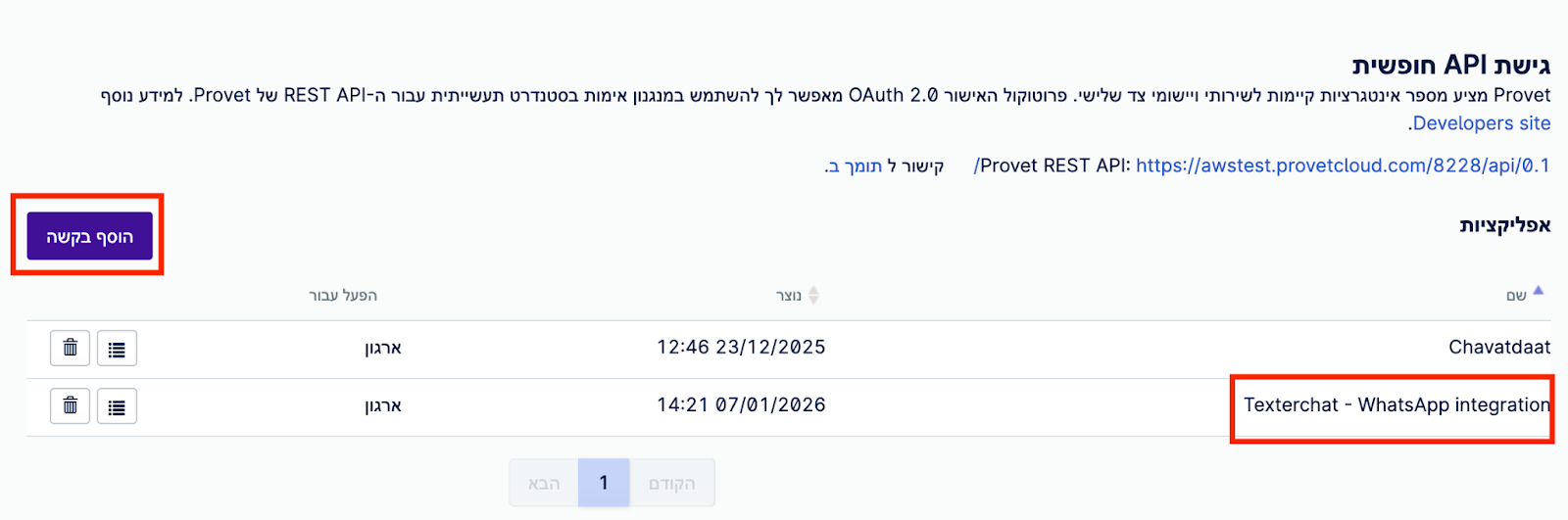
If the app is not visible, follow up with Provet Support until it appears.
4) Obtain clientId / clientSecret for this customer
After the app is enabled in Provet, obtain the OAuth app credentials:
clientIdclientSecret
This is typically retrieved via the n8n workflow Get OAuth Credentials.
5) Configure Texter OAuth service + CRM config
After credentials are obtained, add a new row to the Provet Data Table in n8n.
Ensure the customer config contains the Provet OAuth service config:
"oauthServices": {
  "provet": {
    "enabled": true,
    "config": {
      "orgHost": "https://provetcloud.com/PROVET_ID/",
      "clientId": "CLIENT_ID",
      "redirectUri": "https://n8n.texter.chat/webhook/auth/oauth/v2/authorize-callback/?provet_id=PROVET_ID",
      "clientSecret": "CLIENT_SECRET"
    }
  }
}
redirectUri is requiredOur Provet app uses a fixed redirect URI (partner constraint). We route customer-specific OAuth callbacks via two n8n workflows:
- Get OAuth Credentials — receives a webhook after the app is registered and stores
clientId/clientSecret. - OAuth Redirector — receives the authorization callback and redirects to the correct customer inbox URL based on the data table row.
And add to CRM config the Provet server for adapter calls:
{
  "crm": "provet",
  "section": "crm",
  "server": "https://provetcloud.com/PROVET_ID"
}
Useful Tips
Provet Request Filters and Exposeable Fields
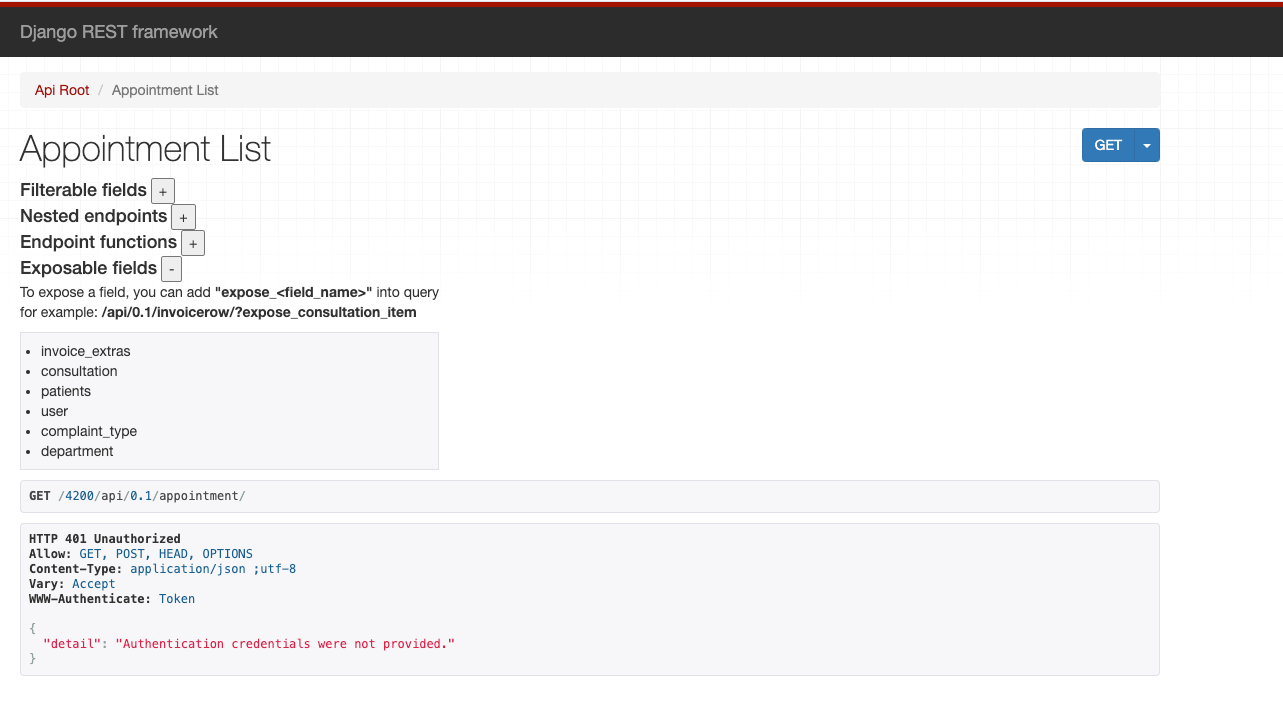
On each endpoint page (for example https://provetcloud.com/4444/api/0.1/appointment/), Provet lists:
- Filterable fields: used as query params (often with double-underscores, e.g.
id__is_not,start__range, etc.). - Exposable fields: add query params like
expose_patient=true(orexpose_<field>) to expand nested objects in the response instead of getting only URLs.
Example page ( .../api/0.1/appointment/ ):
Creating Access Token For Debugging
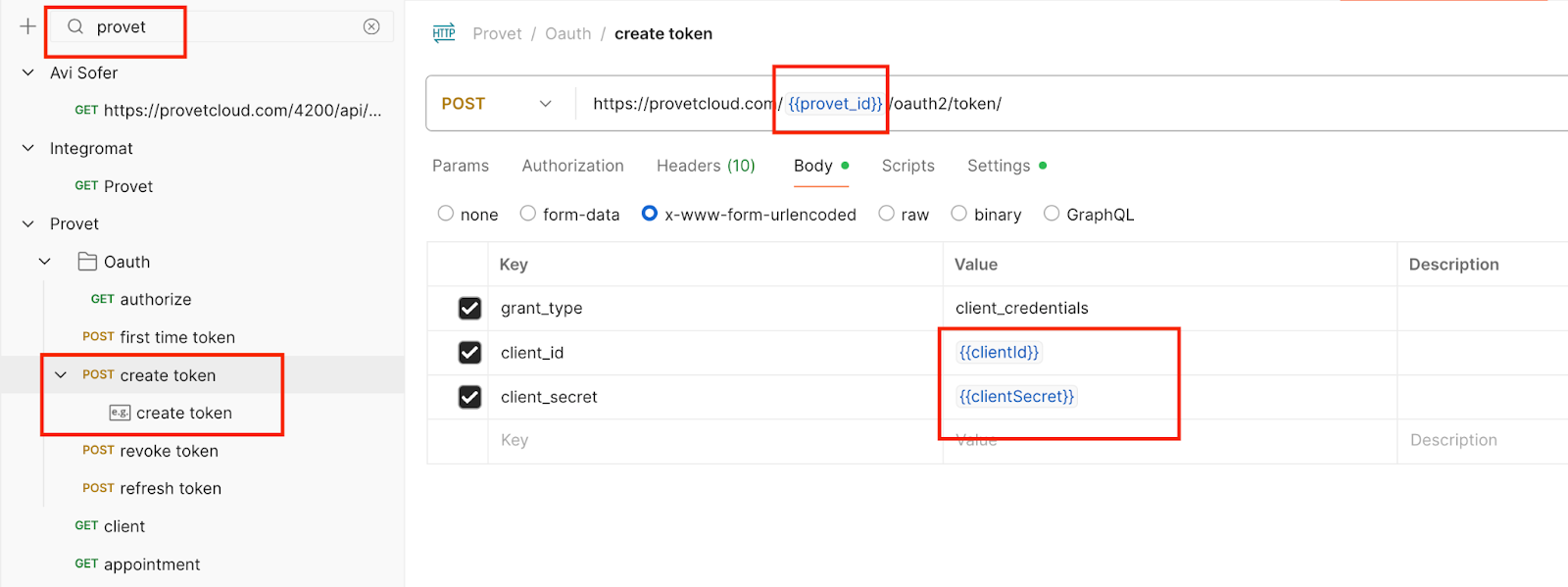
If you need to test Provet API calls manually, generate an access token using Client Credentials with the customer’s provetId, clientId and clientSecret.
curl --location \
  'https://provetcloud.com/PROVET_ID/oauth2/token/' \
  --header 'Content-Type: application/x-www-form-urlencoded' \
  --data-urlencode 'grant_type=client_credentials' \
  --data-urlencode 'client_id=CLIENT_ID' \
  --data-urlencode 'client_secret=CLIENT_SECRET'
Use the returned access_token as a Bearer token in API requests.