Salesforce
Salesforce is a CRM platform for managing contacts, accounts, leads, cases, and custom objects.
Official Salesforce API docs (for deeper reference):
- SOQL query endpoint —
getCustomerDetails,queryFromBot(/services/data/vXX.X/query) - SObject Rows (create) —
openTicket(/services/data/vXX.X/sobjects/{ObjectName}/) - SObject Rows (update) —
updateRecord(/services/data/vXX.X/sobjects/{ObjectName}/{Id})
API version used in code is v42.0 (jsforce package version default), if we ever need to update this version we must make sure that all functions functionality is not broken.
CRM config (crmConfig)
| Field | Required | Default | Use |
|---|---|---|---|
contactObjectCustomFields | No | Uses default field set | Array of Contact field API names to select in getCustomerDetails. When provided, it replaces the built-in default Contact field list (Id, AccountId, Name, Title, MobilePhone, Phone, MailingAddress, Email). ⚠️ Replacement is total — if your override list omits Id, AccountId, Name, MobilePhone, Email, or MailingAddress, the corresponding crmData.id/accountId/name/phone/email/mailingAddress/deepLink will be missing from the result. Always include those API names in the override unless you specifically don't need them. |
customPhoneFieldName | No | — | Additional contact phone field API name to include in lookup filter (for example a custom Field__c). |
alternativeContactObjectName | No | Contact | Object API name to query instead of Contact in getCustomerDetails. |
Adapter functions
getCustomerDetails
Looks up a contact by phone (and phone variants), then enriches with account data.
When it runs: At chat start or when opening chat context to identify and load CRM contact/account details.
Basic
  sf_lookup:
    type: func
    func_type: crm
    func_id: getCustomerDetails
    on_complete: known_customer
    on_failure: unknown_customer
| Param | Required | Notes |
|---|---|---|
contactCustomFields | No | Array of Contact field API names to append to the query. Must contain only alphanumeric characters and underscores. |
accountCustomFields | No | Array of Account field API names to append to the account query. Same validation rule as above. |
Result: On success, crmData includes:
crmData field | Source |
|---|---|
contactId | Contact Id from the contact query |
Contact | Full first matching contact record |
contactAmountRecords | totalSize from the contact query response |
email | Contact Email (if present) |
mailingAddress | Concatenated from MailingAddress.street, city, and optional postalCode |
accountId | Account Id from account lookup by AccountId |
Accounts | Account records returned from the account lookup, indexed as a numeric-keyed object (e.g. { "0": {...} }) — NOT a true array, due to how the adapter spreads them. Use crmData.Accounts.0 to read the first record. |
name | Contact Name |
phone | Contact MobilePhone |
deepLink | ${instanceUrl}/${accountId} |
id | Contact Id |
Returns on_failure if: no contact record is found, SOQL query fails, custom field names fail validation, or an exception is thrown.
Advanced — query extra contact/account fields
  sf_lookup_with_custom_fields:
    type: func
    func_type: crm
    func_id: getCustomerDetails
    params:
      contactCustomFields:
        - "Field59__c"
        - "Customer_Status__c"
      accountCustomFields:
        - "Industry"
        - "OwnerId"
    on_complete: known_customer
    on_failure: unknown_customer
openTicket
Creates a Salesforce record in a target object from bot-provided fields.
When it runs: Usually after collection steps to open a ticket/case/lead-like record in Salesforce.
Basic
  sf_open_ticket:
    type: func
    func_type: crm
    func_id: openTicket
    params:
      object: "Case"
      Subject: "WhatsApp request"
    on_complete: ticket_created
    on_failure: ticket_failed
| Param | Required | Notes |
|---|---|---|
object | Yes | Salesforce object API name to create (for example Case, Lead, Custom_Object__c). |
| Any other param | No | Sent as a field in the create payload. Field names must match Salesforce API names for the chosen object. |
Result: crmData.lastRecordId is set to the created record ID, and lastMessageStoredInCRMTimestamp is returned from the last chat message.
Returns on_failure if: create call fails, Salesforce returns unsuccessful create result, or an exception is thrown.
queryFromBot
Runs a SOQL query template with one dynamic value injected at runtime.
When it runs: For custom read operations that are not hardcoded in the adapter but can be represented as a single query.
Basic
  sf_custom_query:
    type: func
    func_type: crm
    func_id: queryFromBot
    params:
      query: "SELECT Id, Name FROM Contact WHERE Phone = :dynamic_value"
      queryDynamicValue: "%chat:channelInfo.id%"
    on_complete: query_ok
    on_failure: query_failed
| Param | Required | Notes |
|---|---|---|
query | Yes | SOQL string that must contain the literal placeholder :dynamic_value. |
queryDynamicValue | Yes | Replacement value injected into the query string before execution. |
Result: First query record is stored in crmData.customQueryObject (merged with existing crmData).
Returns on_failure if: required params are missing, query returns an error, query returns zero records, or an exception is thrown.
updateRecord
Updates an existing Salesforce record by ID.
When it runs: After a record was already created/found and you need to set additional fields.
Basic
  sf_update_record:
    type: func
    func_type: crm
    func_id: updateRecord
    params:
      object: "Lead"
      recordId: "%chat:crmData.lastRecordId%"
      Status: "Working - Contacted"
    on_complete: updated
    on_failure: update_failed
| Param | Required | Notes |
|---|---|---|
object | No | Object API name to update. Defaults to Lead. |
recordId | Yes* | Record ID to update. *If omitted, uses %chat:crmData.lastRecordId%. |
| Any other param | Yes | Treated as fields to update. Field names must be alphanumeric/underscore only. At least one field is required. |
Result: Returns success: true on successful update.
Returns on_failure if: no record ID is resolved, no updatable fields are provided, field-name validation fails, Salesforce update fails, or an exception is thrown.
Salesforce Onboarding (for Texter Support)
These steps are for connecting a customer Salesforce org to Texter via OAuth.
1) Create / configure the Connected App (Salesforce)
- Log in to Salesforce as an Admin (non-admin users often can’t create apps).
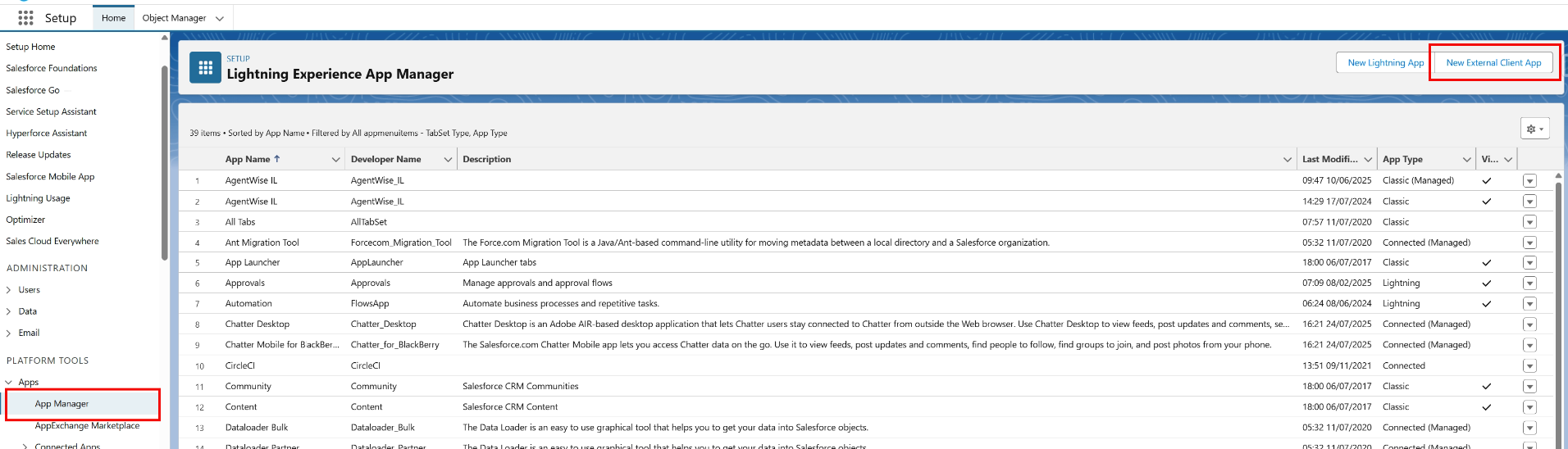
- Go to Setup → Platform Tools → Apps → App Manager.
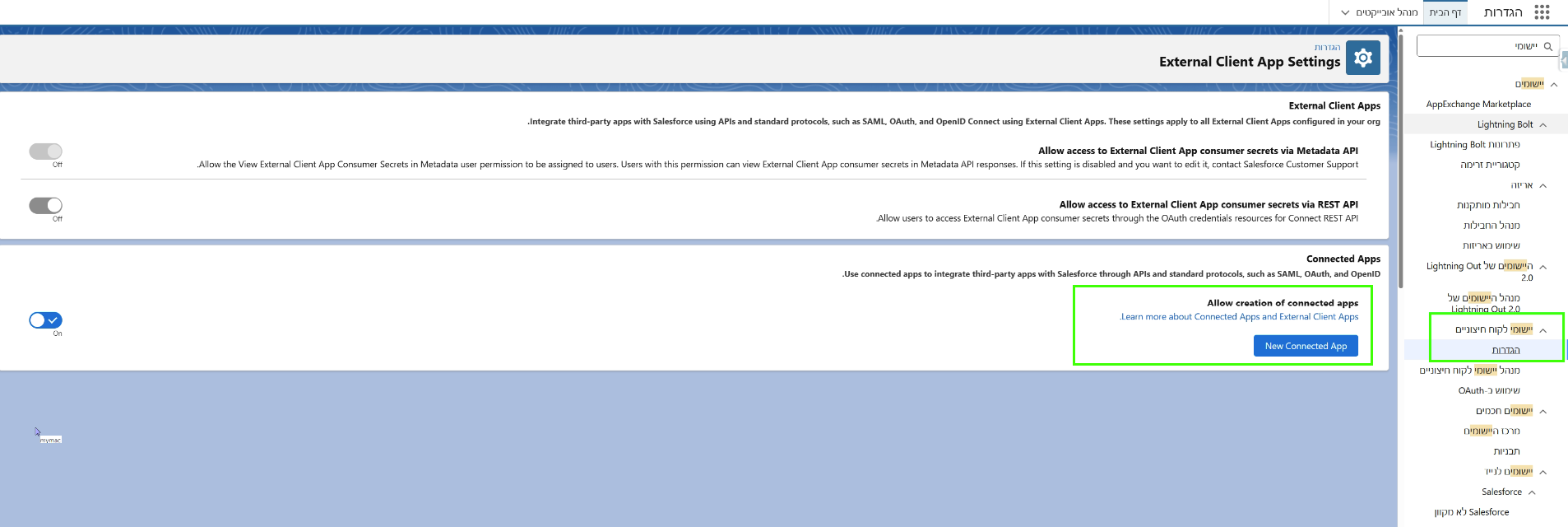
- Create a new app (Connected App / External Client App depending on UI).
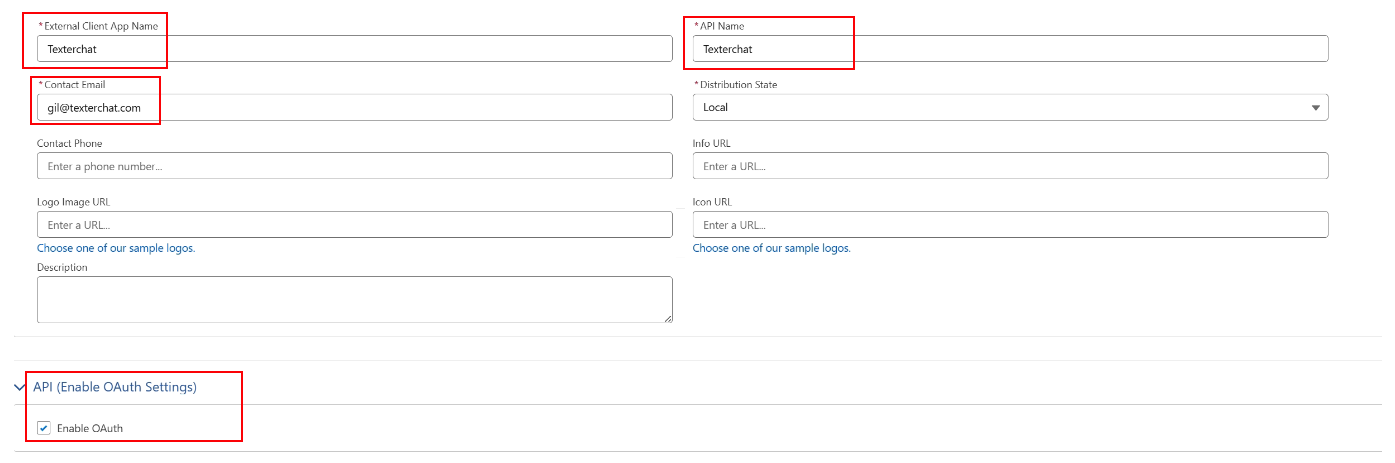
- Fill out application name (Texterchat Integration), email (gil@texterchat.com) and enable Oauth
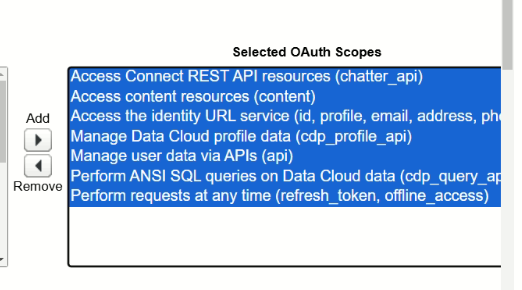
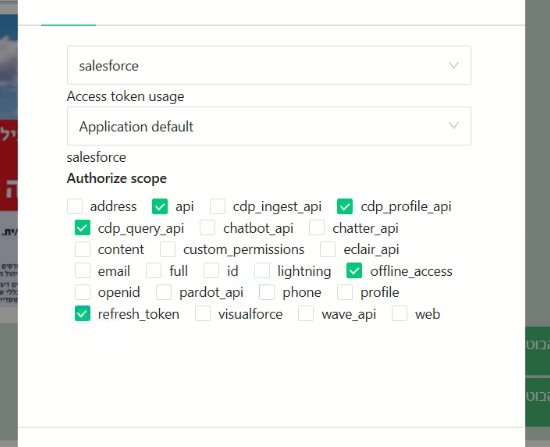
- Add Permission Scopes to application.
Recommended OAuth settings (names may vary slightly by Salesforce UI/version):
- IP Relaxation: Relax IP restrictions
- Refresh Token Policy: Refresh token is valid until revoked
- Permitted Users: All users may self authorize
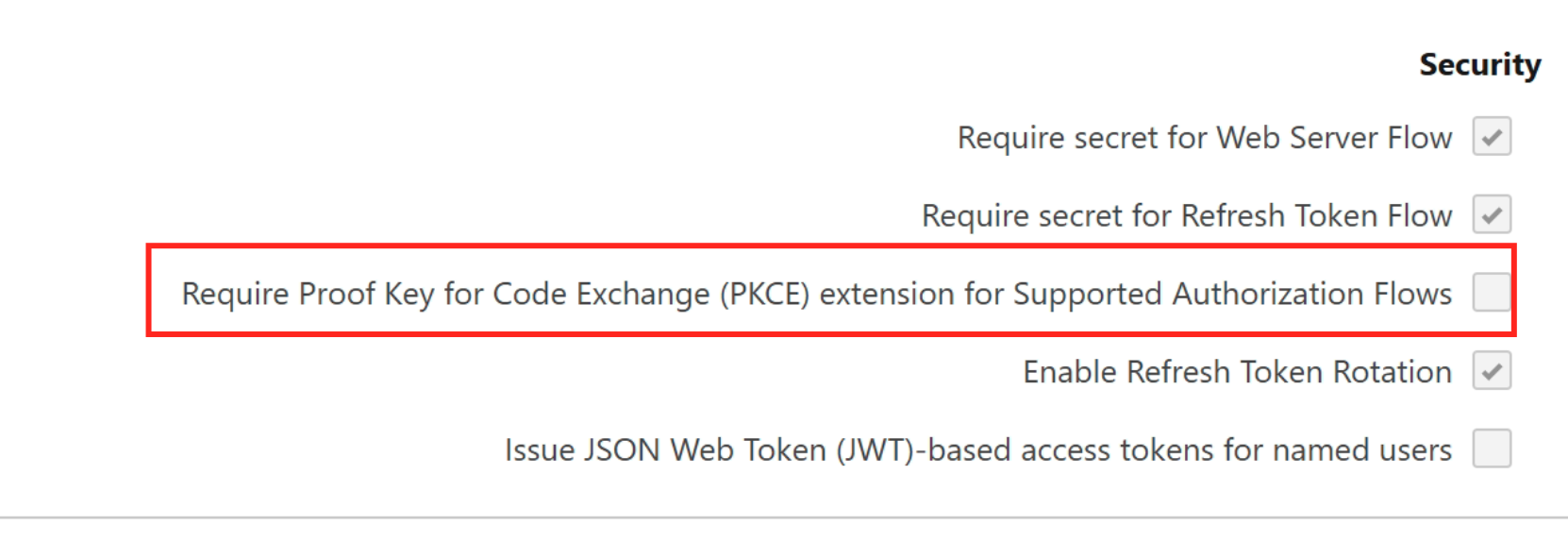
- PKCE: disable (uncheck/cancel PKCE)
Callback / Redirect URL (must match exactly):
https://PROJECTID.texterchat.com/server/auth/oauth/v2/authorize-callback/salesforce/default
2) Configure customer oauthServices (Nihul)
Add (or merge) the following under the customer config root:
{
  "oauthServices": {
    "salesforce": {
      "enabled": true,
      "config": {
        "orgHost": "https://{{yourOrg}}.my.salesforce.com",
        "consumerKey": "CONSUMER_KEY",
        "consumerSecret": "CONSUMER_SECRET",
        "sandbox": false
      }
    }
  }
}
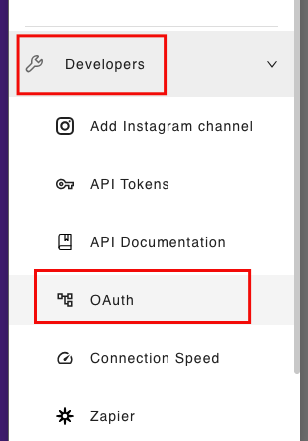
3) Complete OAuth authorization
Have the customer authorize the app in their Salesforce UI (often via screen-share). If the authorization step fails, re-check the callback URL and OAuth settings first.
Useful queries (for Texter Support)
- You need a valid Salesforce instance URL (replace
YOUR_INSTANCE). - You need an OAuth access token (replace
YOUR_ACCESS_TOKEN).
Find Record Types (e.g. for “Service Request”)
If a customer asks us to do something with an object like “Service Request” and we’re not sure how it’s modeled in their org, start by listing all Record Types:
curl --request GET \
  --url "https://YOUR_INSTANCE.salesforce.com/services/data/v62.0/query?q=SELECT+Id,Name,DeveloperName,SobjectType,IsActive+FROM+RecordType+ORDER+BY+SobjectType,Name" \
  --header "Authorization: Bearer YOUR_ACCESS_TOKEN"
Then either:
- Scan the response and locate the relevant
SobjectType/Name/DeveloperName, or - Add a filter to the SOQL query (for example a
WHERE Name = '...') once you know what you’re looking for.
Inspect object fields (describe)
If you already know the object API name and need to understand which fields exist (and their API names), use the object describe endpoint:
curl --request GET \
  --url "https://YOUR_INSTANCE.salesforce.com/services/data/v62.0/sobjects/Account/describe" \
  --header "Authorization: Bearer YOUR_ACCESS_TOKEN"
Replace Account with the object you want to inspect.
If you specifically need Record Type metadata, use the RecordType object instead of Account.